

Tools and providers
Part of Vetting a web design agency's tools and suppliers in the UK
Best tools for web design agencies: five categories with exact editions
A non-ranked, source-led shortlist of five distinct web-agency tool categories, with exact editions, desk-research limits and documented buyer checks.
There is no defensible single best tool for a web agency. A design workspace cannot replace a CMS, repository, analytics service or accessibility test. This non-ranked shortlist gives an England buyer five category-specific candidates to investigate.
Every price below is an indicative figure, not a quote or an offer, because suppliers bill per seat in US dollars and revise list rates.
What to take away
- No single tool covers design, CMS, source control, analytics and accessibility for a web agency.
- Each named edition is a category candidate, not a superiority finding or ranking.
- Supplier pages describe product claims, not your privacy, security or accessibility outcomes.
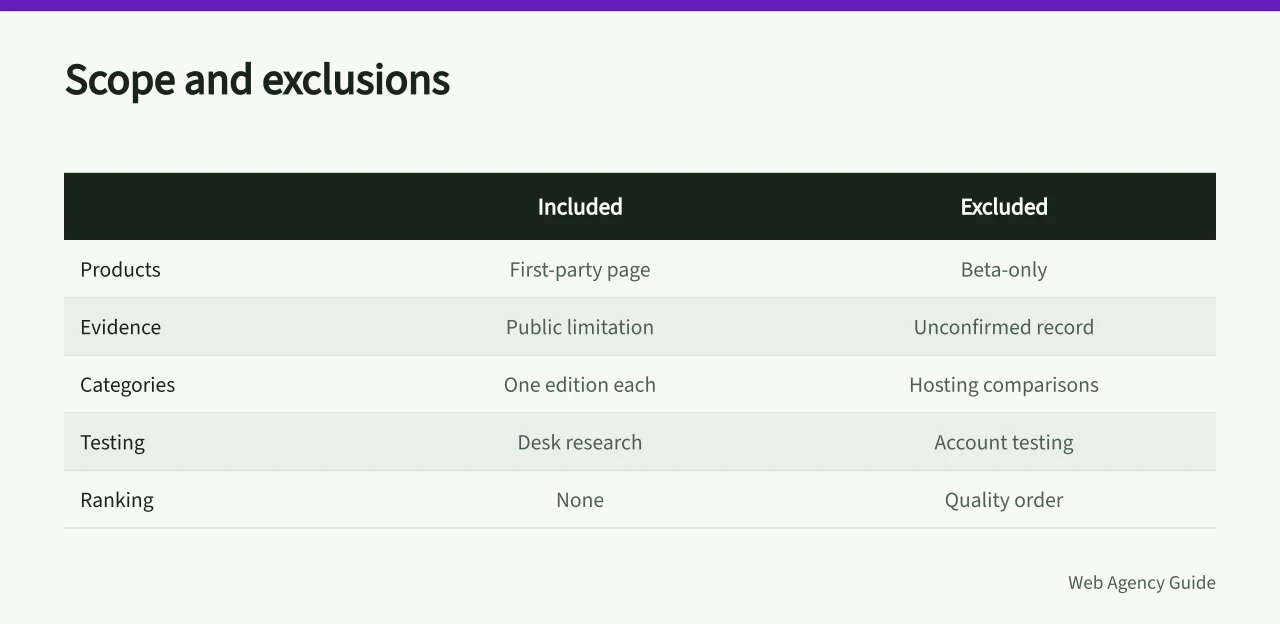
Method and limits
- Research date
- 6 September 2026.
- Scope
- products with a current first-party page describing a distinct agency task and public evidence for at least one material limitation or control.
- Inclusions
- one named edition or service per category.
- Exclusions
- hosting comparisons, form builders, project-management systems, beta-only products and tools whose identity or current public record could not be confirmed.
- Ranking
- none. Order follows a typical design-to-assurance workflow, not quality.
- Testing
- desk research only. No account, output, support route, security control, export or assistive-technology path was tested.
- Conflicts
- no affiliate link, payment, gift, supplier access or commercial relationship was used.
"Best" describes the search question, not a superiority finding.
England and UK buying notes
PECR and UK GDPR shape analytics choices, and the ICO publishes the cookie guidance English buyers work from. Consent records and lawful basis sit with the agency, not the supplier.
US suppliers quote in US dollars and convert at checkout, so check the invoice for UK VAT and your recovery position. Support often follows US time zones, so ask for the support tier and escalation route in writing.
1. Figma Professional for interface work
Figma's current Professional plan overview names Figma Design, team libraries, version history and sharing controls within that plan. It is included as a design and prototyping candidate, not a publishing platform.
Figma bills Professional per seat, listing a full design seat at about 16 US dollars a month on annual billing.
The supplier's shared-responsibility model assigns customers tasks such as device security, authentication, user access and connected applications.
Alternatives considered: Sketch, macOS only, and Penpot, where self-hosting adds admin work.
2. WordPress.com Business for managed CMS work
The WordPress.com Business plan record states that hosting, staging, plugins and developer access are within this edition. It is a managed service, not the same procurement as downloading open-source WordPress and choosing a separate host.
WordPress.com lists Business at about 25 US dollars a month on annual billing, with a higher month-to-month rate.
WordPress.com's accessibility guidance says site owners still determine the accessibility of the assembled site.
Alternatives considered: Kinsta, hosting only, and Webflow, a closed builder with a limited export path.
3. GitHub Team for source control
GitHub's plans documentation identifies GitHub Team as an organisation plan and describes its support and usage allowances. It is included for repository collaboration, not as evidence that a deployment is secure.
GitHub lists Team at about 4 US dollars per user a month, with a lower effective rate on annual billing.
GitHub publishes separate accessibility documentation and product conformance records. Buyers should match the exact interfaces their staff use and test their own access path.
Alternatives considered: GitLab, whose free tier caps compute minutes, and Bitbucket, whose pipeline allowances differ.
4. Cloudflare Web Analytics for measurement
Cloudflare's Web Analytics documentation describes a JavaScript beacon, real-user monitoring and the supplier's statement about visitor personal data. That is a product claim, not a UK PECR conclusion.
Cloudflare offers Web Analytics at no charge on its Free plan and sells a paid tier with higher allowances.
The Cloudflare privacy policy covers Cloudflare's own collection and distinguishes customer websites. A buyer still needs a purpose, event specification, configuration record and qualified privacy review.
Alternatives considered: Plausible Analytics, subscription only with no free tier, and Google Analytics 4, with a heavier consent workload.
5. WAVE browser extensions for accessibility checks
WebAIM's extension page says the browser extensions evaluate rendered pages locally. WAVE remains one test input. Its own terms and limitations warn against treating the service as a measure of discrimination.
The browser extensions are free, and the separate WAVE API and subscription service carry a charge.
Alternatives considered: axe DevTools, whose free extension exposes part of the rule set, and Lighthouse, where one run samples rules.
How to use the shortlist
Define one task per category, retain the manual baseline, and test with authorised fixtures. Record the evidence owner and expected result before opening an account. Reject any candidate that fails a mandatory privacy, security, accessibility, IP, consumer, procurement, contract, VAT, continuity or exit gate.
Reopen every cited page on purchase day because names, editions and terms can change.
How to use the shortlist
- Define one task per category
- Retain the manual baseline
- Test with authorised fixtures
- Record evidence owner and result
- Reject candidates failing mandatory gates
- Reopen every cited page on purchase day
Before you act
- Define one task per category before comparing candidates.
- Retain the manual baseline alongside any automated check.
- Test with authorised fixtures before opening an account.
- Reject any candidate failing a mandatory privacy, security or accessibility gate.
- Confirm the current price, currency, UK VAT and export path before you buy.
Common questions
Why is there no single best tool for a web agency?
The article states a design workspace cannot replace a CMS, repository, analytics service or accessibility test. It gives a non-ranked shortlist of five category-specific candidates instead, ordered by a typical design-to-assurance workflow rather than quality, so no single product is presented as superior.
What evidence was used to select the five products?
Scope covered products with a current first-party page describing a distinct agency task, plus public evidence for at least one material limitation or control. Hosting comparisons, form builders, project-management systems, beta-only products and unconfirmed tools were excluded.
What should a buyer do before opening an account?
Define one task per category, retain the manual baseline and test with authorised fixtures. Record the evidence owner and expected result before opening an account. Reject any candidate that fails a mandatory privacy, security, accessibility, IP, consumer, procurement, contract, VAT, continuity or exit gate.